Re: Input not loud enough
Posted: Sun Mar 08, 2009 11:17 pm
So it must be your J-Station. Line in/out level adjustment? Are you using a new mic cord?
Illegitimi non carborundum
https://songfight.net/forums/
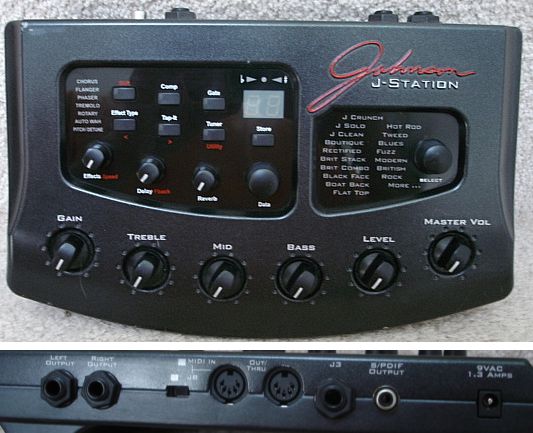
Ok, I'm going to break down the things one at a time that caught my eye. I'm very good at trouble shooting in real life and I get paid very well for it. But bear with me (or bare with me if this sort of thing is your "thing") as I use the information that "you" are giving and my incredibly fast pick and peck typing skill.Generic wrote:Let's follow the line. On one end, we have the microphone. It doesn't have a volume control. It's plugged, via an LXR-to-1/4" Phone cable, into the "Instrument" port of the J-Station. The J-Station has a couple of different volume knobs. One is labelled "Level," and this one is supposed to change as you swap between presets. The other is labelled "Master Volume," and it's not designed to change unless you move the knob. Both knobs are turned all the way up.
The J-Station has stereo output. I've got a 1/4" cable plugged into the left output on the J-Station. This 1/4" cable connects, via a 1/4"-to-1/8" adapter, to the microphone jack on my computer. There's no input volume control (at least none that I've seen).
It's not the mic cable, and it's not the mic. It could be the J-Station, the output cable, the 1/4"-to-1/8" adapter, or my computer, but these are all ruled out because they record instruments just fine. They just can't handle microphone input.
Curiouser and curiouser.

As a matter of fact...Lunkhead wrote:I can't resist butting in with this unhelpful info: Lexicon Alpha, $80, problems solved, recording quality greatly improved. Mic input minijack on soundcard = major janky, it's the hard truth.
Yep, almost as long as you've been acting like a jackass on the Internet.Sober wrote:Jesus, Jon. You've been doing this for what, 6 years?
Yes, the mic cord is about two weeks old. It was the first suspect, and also the cheapest to replace. Didn't help. Also, yes, I meant to say XLR. Oops.Billy's Little Trip wrote: 1. LXR-to-1/4" Phone cable = I'm pretty sure this is XLR. I know you got a new mic, but you still didn't answer if it's a new mic cord. So until I hear that it is, the cord goes on my list.
Yes. The "level" is automatically adjusted with the preset... unless you move the "level" knob, at which point it readjusts. I've made a habit of tweaking the knob a little bit any time I change anything, just to make sure.2. One is labeled "Level," and this one is supposed to change as you swap between presets = If your presets on your J-Station are like my past guitar FX stations, you set and save the volume level of the preset. My Peavey had many "factory" presets that were unchangeable other than with a foot pedal for volume or wah. On the other hand, my POD foot pedal over rides all volume out on the fly at any time, then when switched to a new pre set and then come back to the preset I used the vol peddle on, it's back to my preset, as it should be. I also have a line out level control on the back that needs a screwdriver to turn it, that is Independent from my face plate level and volume knobs. But I'm sure you would have discovered that by now.
That occurred to me as well, and it was driving me crazy trying to see if there was a button or switch I inadvertently flipped. The hundredth such search once again proves that there is no such switch. JB and Glenn both own J-Stations; could they confirm that there isn't some obvious setting I've been overlooking?3. I've got a 1/4" cable plugged into the left output on the J-Station = This is correct, because universally the left out is mono and that's how is on my POD. BUT, on my old Peavey unit, it did not do that until I depressed the stereo mono button. It would continue acting as a left channel which then went into my amp as mono, so I would twiddle knobs and cables until I would do the V8 smack to my head and remember the stereo/mono button.
Yeah, this is one of those snap-in adapters. If it's the culprit, I'm going to tear off my ponytail. Still, my keyboards and guitars record just fine when direct-lined, so I'm not quite convinced.4. via a 1/4"-to-1/8" adapter = The adapter is probably the one thing that popped out to me the most.
4a. There are several types of 1/4"-to-1/8" adapters. They are very compact and they're not like a 1/4" jack on your amp, J-station, etc. They make their connection with a internal snap ring in many cases and this usually is not serviceable. I once had an adapter go from working to not working in the same recording session.
It's actually a stereo phone cord (gold, two rings), but other than that, you've got the picture right.4b. Are you using a mono guitar type 1/4" cord going from your J-Station to the 1/4"-to-1/8" adapter? I'm guessing you are because they are common and everyone seems to have extra cords laying around. I DO have stereo cables for our old PA system, but packed away.
What do you mean by "headphone adapter?" My headphone adapter, which I use for monitoring purposes, goes from 1/8" to 1/4", not the other way around. (The adapter is mono, and not stereo, if that's what you're asking.)4c. Are you using a headphone 1/4"-to-1/8" adapter? Headphone adapters are stereo. if we combine 4b and 4c, only half of your adapter is working and giving your computer line in jack half the signal. I'm not sure off the top of my head how this will react by the time it gets to your music program. But my knee jerk thought is that if you are recording on a mono track, your stereo line in from your computer is giving half a signal to your mono music track. Try setting the track on your music program to stereo. See if the signal responds to just the left or right. My PreSonus Firebox is left when plugged into mic 1 and right in mic 2. When I record mono, track 1 is mic IN1 and track 2 is mic IN2, etc. So it does send the signal to IN1 and IN2 appropriately. If you are always sending in to a left side of your computer line in, does it always just go to your IN1 on the buss?
See above. You might have found it.4d. Now let's say that 4c is out of the equation. Let's say that your 1/4"-to-1/8" adapter is a mono adapter. You are plugging your your mono cable to your mono adapter to your stereo line in on the computer. Again, only half the signal is getting to your music track.
Yep. Checked it embarassingly late in my self-diagnosis procedure, but when I finally got around to it, it was turned all the way up. I know, sometimes you gotta ask the stupid questions.4e. I hate to even mention this because I'm sure it's the first thing you checked. Do you have your computer line in volume control turned all the way up, lol. Sorry, I had to ask. I know you said the instruments work fine, but instruments always have more than you need and dynamic mics are always the weakest signal in the mix.
Shoot. The only Y-cable I have is one out, two in. This sounds like it might look silly, but it might work.To sum up #4.
method 1. For your chain to work, it seems that you need 2 mono 1/4" cords from your J-Station left and right. Then you need a 1/4' stereo Y to 1/8" stereo adapter to go to your computer line in.
Hmm.... I don't know if I can set my computer's line-in to mono. I'll try it next time I boot to Windows, though.methos 2. Change your computer line in to a mono signal and make sure all your cords and adapters are single/mono from the left out of your J-Station.
That's all I have on #4 for now.
You're scaring me, dude.5. It could be the J-Station, the output cable, the 1/4"-to-1/8" adapter, or my computer, "but these are all ruled out because they record instruments just fine". They just can't handle microphone input. = Actually, it does not rule anything out. Remember, all instruments that can be plugged directly in to an amp have some form of pre-amplification. Mics do too, but it's very low. I can't remember the exact millivolts off the top of my head.
Yes.Billy's Little Trip wrote: OK, now you said, "It's actually a stereo phone cord (gold, two rings), but other than that, you've got the picture right." So this is the cord coming out of the J-Station to the 1/4" to 1/8" adapter?
In this case, I'd say use a stereo 1/4" to 1/8" adapter. That way it's taking the same path all the way from the J-Station to your computer. Your computer sound card is giving your music program what it is asking for, then your music program can sort it out, which it will. IN-1 on the buss.Generic wrote:Yes.Billy's Little Trip wrote: OK, now you said, "It's actually a stereo phone cord (gold, two rings), but other than that, you've got the picture right." So this is the cord coming out of the J-Station to the 1/4" to 1/8" adapter?

You've spent $138 getting this still-inferior setup working again. For the same money, you could be recording with a cheap condenser through a usb interface with real mic preamps. Instead, you're still recording into a dynamic mic through a guitar pedal into a fucking soundblaster.Generic wrote:Yep, almost as long as you've been acting like a jackass on the Internet.
While I disagree that an investment in an SM58 is "flushing money down the toilet", I agree that your next move should be a USB or firewire A/D box with a couple of decent preamps. The sound card is the weakest link in your current signal chain.Sober wrote: You've spent $138 getting this still-inferior setup working again. For the same money, you could be recording with a cheap condenser through a usb interface with real mic preamps. Instead, you're still recording into a dynamic mic through a guitar pedal into a fucking soundblaster.
I don't act like a jackass, I am an asshole. But, I am also right in this particular case. As long as you continue to screw around with your current setup in lieu of scrapping it entirely, you will be flushing money down the toilet and your recordings will never progress in quality.
About three-quarters of that money was for an SM58. Well that's money down the toilet, right? If I do actually get a USB interface, I'm still going to plug my microphone into it using the same XLR cord that I bought while trying to fix this setup.Sober wrote: You've spent $138 getting this still-inferior setup working again. For the same money, you could be recording with a cheap condenser through a usb interface with real mic preamps. Instead, you're still recording into a dynamic mic through a guitar pedal into a fucking soundblaster.
I don't act like a jackass, I am an asshole. But, I am also right in this particular case. As long as you continue to screw around with your current setup in lieu of scrapping it entirely, you will be flushing money down the toilet and your recordings will never progress in quality.
Lunkhead wrote:I can pound a screw into wood with a hammer but I'm better off using a drill.

irwin wrote:While I disagree that an investment in an SM58 is "flushing money down the toilet", I agree that your next move should be a USB or firewire A/D box with a couple of decent preamps. The sound card is the weakest link in your current signal chain.
Not usually one to nitpick, but I want to make an important point, and it's about purchasing priorities.Generic wrote:About three-quarters of that money was for an SM58. Well that's money down the toilet, right?
Ok, I never faulted you for buying a cable.If I do actually get a USB interface, I'm still going to plug my microphone into it using the same XLR cord that I bought while trying to fix this setup.
For starters, with the USB Input alone, you'd have zero bus noise, which is very audible around 2:15, and comically overwhelming at the end. With USB + condenser, the acoustic guitar and the vocal would be 100% clearer and easier to mix. Also, please bring the kick down, it's riding the threshold the whole way through (you mixing on headphones?).At this point, believe it or not, I'm relatively content with my audio fidelity. Listen to the cover I just recorded last night and explain to me the ways it would have sounded different if I'd run the input through USB instead of microphone-in.
I guess I wasn't clear in my post. For $140, you could have a USB interface AND a cheap condenser. Having BOTH of these is absolutely key, and should be regarded as a mandatory starting point for anyone wanting to record at home. Sorry I haven't been a daily Songfight lurker for a good year now, but I gave advice when I saw the opportunity.If, instead of buying replacement parts for my existing setup, I had taken your advice (which you didn't even bother to give until after I'd solved my own problem), I'd be using a USB audio interface to process the input from this microphone. So yeah. Totally wasted my money, didn't I?
Because it's standard equipment for people who noodle around with guitar. The fact that it's not in stomp-pedal form actually makes it even less useful, but I guess Ken and I are dumb.One final side note: why do you and Ken both think that this is a guitar pedal?