Page 1 of 2
Panning in Cubase
Posted: Thu Jan 01, 2009 10:41 pm
by Reist
I'm just starting to figure out Cubase LE, but I can't for the life of me find how to pan. Honestly, it's really starting to piss me off, since it's a pretty basic concept and stuff's nearly impossible to mix without panning. Could any of you help me out with this? Thanks!

Re: Panning in Cubase
Posted: Fri Jan 02, 2009 12:05 am
by Billy's Little Trip
You came to the right place.
Ok, I'll say it in steps:
There are a few ways, but here's what I do
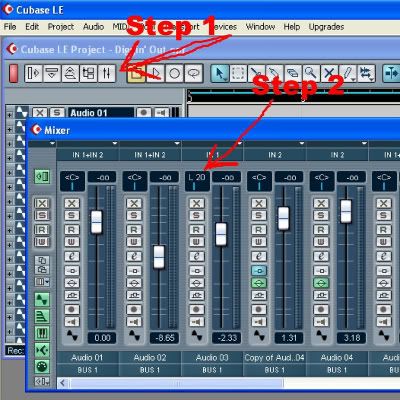
1. At the upper left there are 5 white boxes. The fifth one has two faders side by side. That's your track mixer. Click it
2. Now with the mixer open, click on the little drop arrow to the upper left, right under the word "mixer." It will give you the choice of narrow or wide. I like wide, so click wide.
Now you will see the panning bar at the top of each track. Looks like this <C> with a little vertical blue bar under it. Use your mouse cursor to drag the blue bar left or right.
Re: Panning in Cubase
Posted: Fri Jan 02, 2009 12:48 am
by Lunkhead
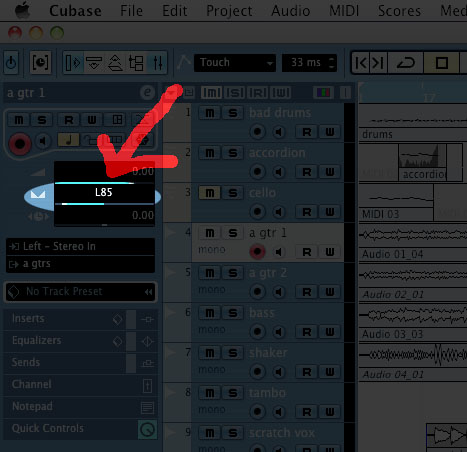
It's under the volume:
- pan.jpg (65.67 KiB) Viewed 3249 times
Re: Panning in Cubase
Posted: Fri Jan 02, 2009 11:38 am
by Reist
Thanks, guys!
Re: Panning in Cubase
Posted: Fri Jan 02, 2009 4:20 pm
by ken
F3 opens the mixer!
Re: Panning in Cubase
Posted: Sat Jan 03, 2009 10:41 am
by Reist
Haha, good to know! I tried this out, and it seemed to work. I also figured out how to set those little arrow things at the top with ctrl and alt so I could finally publish a mix.

Re: Panning in Cubase
Posted: Sat Jan 03, 2009 10:59 am
by Billy's Little Trip
I've been using LE for about 2 years now, so ask anything when you hit a dead end. I'm still learning new things with it, even though I thought I new everything about it 6 months ago. I love Cubase, but then again it's the only music program I've ever used.
TIP: Another thing that's helpful. When using the EQ, hold alt when you click the knobs and it gives you a slide control. Now click shift and it gives you slowed movement so you can fine tune to the slightest detail. You'll find this feature available with most of the controls.
Re: Panning in Cubase
Posted: Sat Jan 03, 2009 12:36 pm
by Reist
Thanks for the advice. I should get in a fight ASAP so I can try this stuff out.
Re: Panning in Cubase
Posted: Sat Jan 03, 2009 2:58 pm
by signboy
Wow. I've been using Nuendo for about 3 years, and the touchiness of those rptary knobs always pissed me off. You really DO learn something new every day. Thanks, BLT.
Re: Panning in Cubase
Posted: Sun Jan 04, 2009 1:33 am
by Lunkhead
I think you can switch the knobs from rotary to linear in the preferences somewhere, too, so that you don't have to hold down a special key to get access to that, if you want that to be the default behavior.
Re: Panning in Cubase
Posted: Wed Jan 07, 2009 7:45 pm
by jeff robertson
Wow, I'd assumed this thread was going to be about pan laws being difference in Cubase than in some other software, or something really nerdy like that. Which would give somebody a chance to quote Beck and say "I want to defy the logic of all pan laws.."
Sorry.
Re: Panning in Cubase
Posted: Wed Jan 07, 2009 7:58 pm
by jast
I think you can change the pan laws in Cubase. I know you can in REAPER.
Re: Panning in Cubase
Posted: Wed Jan 07, 2009 10:03 pm
by signboy
You definitely can. Cubase is still almost as good a Reaper.
Re: Panning in Cubase
Posted: Sat May 16, 2009 6:25 pm
by bck15
I just got cubase LE with an audiobox usb interface. I know how to pan tracks, but they are not panning when played back. When I try to pan a track to one side, it just plays that side of the track right down the middle. I'm pretty sure it has something to do with the playback settings of the interface, but I can't figure it out. At one point, I changed the ASIO driver from the audiobox to my computer. It worked. The tracks were panned. Then, somehow I screwed up the sample rate Now when I play something back through my computer, it plays at funky speeds. But what I want to do is find a way to pan the tracks when they are played through the interface. Any ideas? Thanks.
Re: Panning in Cubase
Posted: Sun May 17, 2009 2:36 am
by Lunkhead
Are you using headphones or speakers? Make sure your headphones and speakers are plugged in all the way in the back of the audiobox, particularly if you're using headphones. The AudioBox looks like a pretty simple box, so you probably need to check your drivers and Cubase settings. Make sure in your Cubase connections you've got a stereo output that's routed to the left and right outs of your AudioBox, and that your main output channel is going to that stereo output.
Re: Panning in Cubase
Posted: Sun May 17, 2009 10:35 am
by Billy's Little Trip
Another thing I thought of. Be sure that when you export a mix, use the "stereo interleaved" setting. If you export in mono, it will put everything in the center.
edit: Oh, I guess your were talking about the tracks while you are still working with them in the mixer, not after the mix down, right?
Re: Panning in Cubase
Posted: Sun May 17, 2009 12:42 pm
by bck15
Billy's Little Trip wrote:
edit: Oh, I guess your were talking about the tracks while you are still working with them in the mixer, not after the mix down, right?
Right.
I'm sure that the headphones are in right. And, I have my vst connection output set to stereo.
Re: Panning in Cubase
Posted: Sun May 17, 2009 1:37 pm
by Lunkhead
How about some screenshots of your configs for Cubase, the AudioBox, your project, your tracks, etc.?
Re: Panning in Cubase
Posted: Sun May 17, 2009 1:46 pm
by Billy's Little Trip
What's the deal with that "input/playback" knob?

Re: Panning in Cubase
Posted: Sun May 17, 2009 4:02 pm
by Lunkhead
If it's like other similar knobs I've used (like on the FireOne) it just controls the mix of the live audio monitoring of the inputs with the playback audio from the computer.
Re: Panning in Cubase
Posted: Sun May 17, 2009 5:09 pm
by Billy's Little Trip
Oh, ok. I get it now, thanks. I don't have that on my Firebox, but I see it on a lot of interfaces.
My signal comes back to my Firebox from Cubase all ready mixed with my live real time and recorded stuff.
Re: Panning in Cubase
Posted: Sun May 17, 2009 6:08 pm
by bck15
Lunkhead wrote:How about some screenshots of your configs for Cubase, the AudioBox, your project, your tracks, etc.?
Sure . . . how do I make a screenshot?