Page 1 of 1
Cubase 6 "crashes" when I quit. Every time.
Posted: Thu Jun 19, 2014 9:19 pm
by JonPorobil
Are there any other Cubase users who've seen this? It happens every time I close the program, but
only when I close the program, so it's pretty harmless, I think. Just annoying.
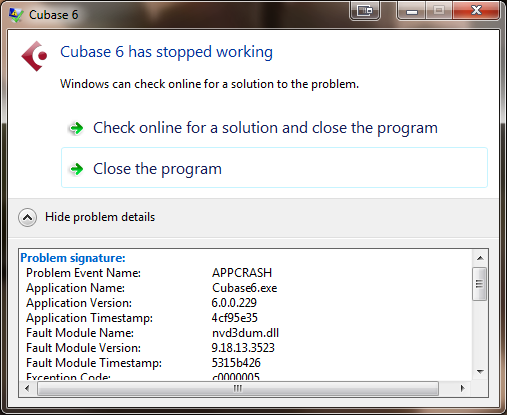
- Cubase Crash Error.png (54.63 KiB) Viewed 2049 times
Re: Cubase 6 "crashes" when I quit. Every time.
Posted: Fri Jun 20, 2014 3:24 am
by AJOwens
Is it controlling any slave applications for which it might have lost the state?
Here's what I mean, by way of example: I use Reaper, and my standard recording template includes a track for a Reason soft synth. When I open the template, Reaper starts Reason and puts it in "slave" mode, meaning that Reaper controls its tempo settings, transport controls, and so on.
Reason, however, starts up with a default template of its own, featuring grand piano as the voice. To change this, I have to go into Reason and select another voice.
I need to save my changes in Reason. Reason is aware that I've made them, and won't close unless I save them. Normally it prompts me. But if I forget to save them, and then close Reaper, Reaper tries to close Reason, and I suppose Reason tries to prompt Reaper or something, but anyway things are now all fucked up and Reason more or less hangs.
Actually none of this is true any more, because the Reaper guys fixed it. But it used to happen. This is the sort of dependency that can make an app hang inexplicably. It might not apply at all in your case, but I thought I'd bring it up.
Re: Cubase 6 "crashes" when I quit. Every time.
Posted: Fri Jun 20, 2014 3:45 am
by jast
It seems to be crashing in your graphics card drivers. Updating those is worth a try, I suppose.
Re: Cubase 6 "crashes" when I quit. Every time.
Posted: Fri Jun 20, 2014 6:48 am
by jb
It's trying to tell you something, Jon Eric.
Re: Cubase 6 "crashes" when I quit. Every time.
Posted: Fri Jun 20, 2014 6:51 am
by Billy's Little Trip
It's one (or more) of your plug-ins that you are using in Cubase causing it. Could be as Jast mentioned and needs a driver update. it seems that's the conflicts are 90% of the time.
I have certain plug-ins that actually use more CPU juice when they're not active, but in the chain on a track. As in, I can watch my CPU usage bar hover around 25% when I'm mixing a bunch of tracks. Then when I hit stop, the CPU bar will spike. If it spikes hard and stays at max for more than a second or two, Cubase crashes. So if I'm really pushing my CPU with a lot of plugs and FX, then use one of the plugs that spike when off, it crashes Cubase every time.
I can't remember the name of one at the moment, because I generally phase those plugs out as I find better replacements that don't weigh my CPU down. It's been a long time since I've had issues because I've pretty much got my engineering and production arsenal dialed in. The only new plugs I get to try out are mic, amp and speaker cab sims, pretty much.
Re: Cubase 6 "crashes" when I quit. Every time.
Posted: Fri Jun 20, 2014 8:51 am
by ken
A quick googling of nvd3dum.dll found that this is a common problem. Here is an article that claims to fix it:
http://www.articlewritingclicks.com/Dll ... r_Tip.html
Re: Cubase 6 "crashes" when I quit. Every time.
Posted: Fri Jun 20, 2014 8:57 am
by JonPorobil
AJOwens wrote:Is it controlling any slave applications for which it might have lost the state?
Possibly SuperiorDrummer, but it also gives me this error when I close after working on a song that doesn't use SD at all (such as "Suitcase").
jast wrote:It seems to be crashing in your graphics card drivers. Updating those is worth a try, I suppose.
My graphics drivers are up to date, but this problem started some time in the last few months, so I might need to
roll back my graphics driver. I'll give that a try.
jb wrote:It's trying to tell you something, Jon Eric.
...
Billy's Little Trip wrote:It's one (or more) of your plug-ins that you are using in Cubase causing it. Could be as Jast mentioned and needs a driver update. it seems that's the conflicts are 90% of the time.
I'm not seeing any CPU drain, which makes sense because most of my plugins are Steinberg, with the only exception being the aforementioned SuperiorDrummer. Of course, it could be a case of one division of Steinberg not knowing what the other is doing... I'll try to load up a song with zero plugins and see if this happens.
Re: Cubase 6 "crashes" when I quit. Every time.
Posted: Fri Jun 20, 2014 9:03 am
by JonPorobil
Hmm. The symptoms don't really match. I wonder if there could be conflicting programs trying to create/access the same-name file?
Anyway. If this article is correct, then my latest video driver update was corrupt or somehow incorrect. I'll try to run another update of the latest driver, and if that doesn't fix it, I'll try rolling it back to the last version that worked.
Re: Cubase 6 "crashes" when I quit. Every time.
Posted: Fri Jun 20, 2014 11:28 am
by Billy's Little Trip
Billy's Little Trip wrote:it seems that's the conflicts are 90% of the time.
Haha. I just noticed my awesome grams.
all your base are belong to us 
Re: Cubase 6 "crashes" when I quit. Every time.
Posted: Fri Jun 20, 2014 7:54 pm
by fluffy
Does Cubsae use GPU-hosted audio effects these days? That's starting to get pretty common and it could be why the crash is happening in the graphics driver.
Re: Cubase 6 "crashes" when I quit. Every time.
Posted: Fri Jun 20, 2014 8:59 pm
by JonPorobil
fluffy wrote:Does Cubsae use GPU-hosted audio effects these days? That's starting to get pretty common and it could be why the crash is happening in the graphics driver.
They might in Cubase 7, but I haven't upgraded. Mine is 6.1.something. I'm pretty sure the last patch I applied to Cubase was back in 2011 or something. Come to think of it, that's another thing I could try!
Re: Cubase 6 "crashes" when I quit. Every time.
Posted: Sat Jun 21, 2014 1:24 am
by fluffy
2011 is still recent enough that GPU-hosted audio effects are potentially a thing (GPGPU started to get popular in research circles way back in 2003!). or maybe they're doing something that Windows naturally GPU-accelerates, drawing-wise, and there's a weird interaction going on there.
Or maybe the graphics driver showing up in the stack trace is a red herring.