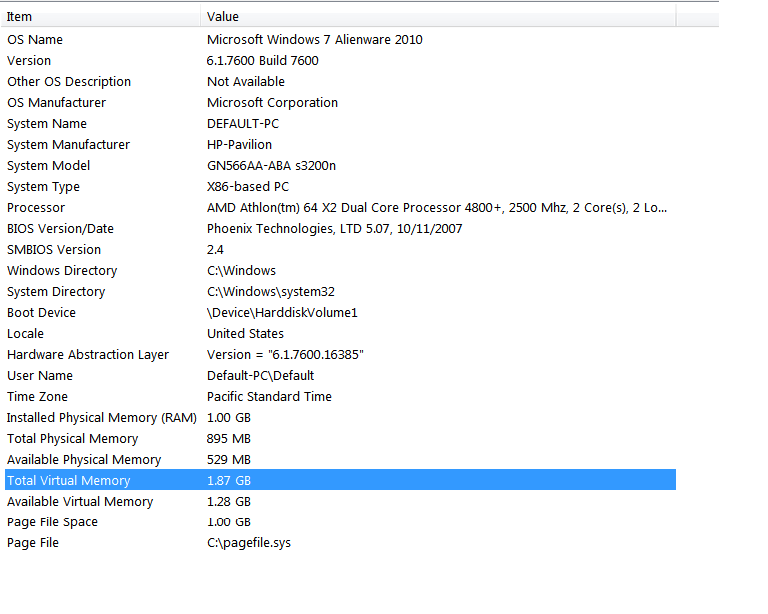
Holy smokes, you've only got 1GB of RAM? Get thee to an electronics store, stat! One more GB of RAM will improve your performance immeasurably, and 1GB dims of RAM at the specs this computer requires are quite cheap these days. Is there a Fry's in your area? If so, just write down the specifications from the HP website [PC2-4200 (533 MHz), PC2-5300 (667 MHz), or PC2-6400 (800 MHz)], take them in, and the guys there will help out. You can probably do this for somewhere between $50 and $100. Here's some online expamples of RAM that will work in your computer:
http://www.google.com/products/catalog? ... os=sellers#
http://www.google.com/products/catalog? ... os=sellers#
http://www.google.com/products/catalog? ... os=sellers#
Also, again I ask: what browser are you running? Firefox is a huge memory hog, and I recommend basically any other browser. My favorite is Chrome, but it's also fairly memory-intensive (unfortunately, most tabbed browsers are, to a degree).
If Youtube is getting you down, you can actually double-check your Flash settings to make sure it's caching enough of the video. Right-click on your video and choose "Settings..." When the pop-up window comes up, you can click on the folder icon, which will give you a slider bar to indicate how much of your memory you want to reserve for video caching. Your 320 GB hard drive should be able to support much higher than the 100kb minimum if you want it to. For reference, a 4:00 video will usually take up about 3kb of cache, but bear in mind that your cache doesn't fully clean out when the video is over, so if you do a lot of Youtoobin', this might help matters at least a little.
If you don't mind getting wrist-deep in your computer, there's a way you can reduce the sympathetic vibrations between the case and the hard drive. Some hardware or electronics stores sell these little rubber stoppers that go between the drive and whatever it's screwed to. The rubber will absorb the hard drive's vibrations before they spread.
Another (more expensive) thing you can do if you're not afraid of making hardware modifications, you can find a Solid State Hard Drive and either supplement your current hard drive with it or replace it entirely (make sure you've got your Windows disk ready). Solid States Hard Drives have no moving parts, which makes them durable, improves your load speeds, and (most importantly) makes them
completely silent. Sadly, they're still pretty expensive, and to minimize loss of usable hard drive space, you'll probably wind up spending over $500 -
http://www.google.com/products/catalog? ... os=sellers#