Page 1 of 3
Computer help - 2 hard drives with XP (updated)
Posted: Mon Jan 24, 2011 10:42 am
by Billy's Little Trip
I have my old computer and it works fine, but it's an old Compaq Pentium 3, 933mhz processor, 512 ram with an 80 gig hard drive running XP.
I have another computer that's an HP duel core Pentium 4 with a 1.8mhz processor and 2 gigs of ram with a 500 gig hard drive running XP.
My question. Can I put the 80 gig hard drive from the Compaq into the HP? I'm guessing that Windows XP is on the hard drives and it would recognize both XP programs that are on each hard drive. Would this be a conflict?
My reason is that I have all of my programs on the Compaq hard drive, like Cubase, etc etc.
Or, would I be better off just uploading all the stuff off the Compaq hard drive to the HP hard drive. The HP has nothing on it but XP.
Thanks in advance for any advice.

Re: Computer help - 2 hard drives with XP
Posted: Mon Jan 24, 2011 10:44 am
by ken
It is fine to have two drives in a computer, but I think you can only have one OS at a time. That might be a problem.
Re: Computer help - 2 hard drives with XP
Posted: Mon Jan 24, 2011 10:47 am
by Billy's Little Trip
That's kind of what I figured, but I don't know if it will just use one OS automatically.
Re: Computer help - 2 hard drives with XP
Posted: Mon Jan 24, 2011 11:09 am
by HeuristicsInc
yeah, one of them will be marked as the boot drive and the xp will work off that one. you'd probably have to enable the second drive in the bios, unless it autodetects... who knows!
you're probably better off copying stuff from one to the other into a subdirectory (via home network or suchlike), rather than putting the second drive in, but i don't think it will yell at you for having xp there on the secondary drive.
-bill
Re: Computer help - 2 hard drives with XP
Posted: Mon Jan 24, 2011 11:51 am
by Billy's Little Trip
Yeah, I guess I can just keep the old Compaq hooked up to my network router and after I get the HP set up on the network, move the files over to the HP hard drive via the network.
edit: which you pretty much just said, Bill, lol.
Re: Computer help - 2 hard drives with XP
Posted: Mon Jan 24, 2011 11:55 am
by ken
I suggest after to get what you need off that second drive, you erase it and use it as a storage/audio drive if it has good specs (7200rpm at least).
http://raincomputers.com/pro/hardware/t ... for-audio/
Re: Computer help - 2 hard drives with XP
Posted: Mon Jan 24, 2011 12:02 pm
by Billy's Little Trip
I have a couple 250 gig hard drives sitting here doing nothing that came out of my son's gaming computer when he upgraded. And I have an external hard drive that's always hooked to the USB port that has all my business stuff on it.
I think that I might put one of these 250 gig drives in the HP just for extra storage.
Re: Computer help - 2 hard drives with XP
Posted: Mon Jan 24, 2011 1:46 pm
by jast
Basically, as long as your current system disk is listed first in the boot order config thingy in the BIOS setup (how you get into that depends on your motherboard), it doesn't matter how many other of your disks contain more copies of Windows (or, for that matter, any other operating system).
Re: Computer help - 2 hard drives with XP
Posted: Mon Jan 24, 2011 11:45 pm
by Billy's Little Trip
Ok, thanks for the help, guys. So far everything is going smooth.
I didn't know that this HP has windows 7 Alienware 2010. Not sure what the perk is with "the alien" part, but it looks cool when the computer boots up. But I'm happy that my Presonus Firebox and Cubase started right up and works perfect so far. I did go to the sites and update the drivers just in case. But they worked fine with the old drivers. Maybe my last update had drivers for windows 7. ?
Re: Computer help - 2 hard drives with XP
Posted: Thu Jan 27, 2011 12:07 pm
by Billy's Little Trip
A new question. Old topic resolved, thank you.
Ok, so I ended up going with a different computer. It's an
HP slimline s3200n.
It's been upgraded to windows 7. It's fast and I really like it. BUT, when I start doing things, like opening pages from forums in new windows, the hard drive and or fan kicks up to high speed. It's really quiet while recording vocals, which I love, but browsing the netz it is high speed, quite, high speed, quiet, continuously.
My question. Is there a way to disable that to keep it at one speed while interwebing?
Re: Computer help - 2 hard drives with XP
Posted: Thu Jan 27, 2011 10:06 pm
by JonPorobil
Billy's Little Trip wrote:A new question. Old topic resolved, thank you.
Ok, so I ended up going with a different computer. It's an
HP slimline s3200n.
It's been upgraded to windows 7. It's fast and I really like it. BUT, when I start doing things, like opening pages from forums in new windows, the hard drive and or fan kicks up to high speed. It's really quiet while recording vocals, which I love, but browsing the netz it is high speed, quite, high speed, quiet, continuously.
My question. Is there a way to disable that to keep it at one speed while interwebing?
It's a little weird that the browser seems to heat up the computer more than your DAW. What browser is it? I've had a lot of luck with Google Chrome, but opinions seem mixed on the matter.
You can probably force the BIOS the cap the fan speed, but I wouldn't recommend doing that. The computer regulates its own temperature, and if it thinks the fan needs to be on high while you're browsing, there's probably a good reason for that.
Maybe you can place the computer inside a cabinet or some comparable construction to isolate the computer's noise?
Re: Computer help - 2 hard drives with XP
Posted: Thu Jan 27, 2011 10:25 pm
by Billy's Little Trip
I'm not sure if it's the fan or the hard drive yet. I'm pretty sure it's the HD. I've never heard a fan get this loud before. And by loud, I don't mean noisy like the bearings are going out. I mean like a wood router you just turned on. Like a very high speed roto-zip, lol. If it's the hard drive, why would it be changing speed so much? I only have 1 gig of ram, could that be why? Could it be using the HD for quick access memory....if there is even such a thing, lol.
I can understand the HD speeding up if I was rendering a movie or mixing down a song. But why surfing the webz?
Re: Computer help - 2 hard drives with XP
Posted: Fri Jan 28, 2011 10:36 am
by HeuristicsInc
Billy's Little Trip wrote:Could it be using the HD for quick access memory....if there is even such a thing, lol.
Using the hard drive for slow access memory, that's called virtual memory, yeah.
-bill
Re: Computer help - 2 hard drives with XP
Posted: Fri Jan 28, 2011 11:12 am
by Billy's Little Trip
HeuristicsInc wrote:Billy's Little Trip wrote:Could it be using the HD for quick access memory....if there is even such a thing, lol.
Using the hard drive for slow access memory, that's called virtual memory, yeah.
-bill
Ok, hmm. I think I've seen a way to adjust that before. Can I make the computer
not use the HD while browsing the webz?
And here is something interesting I just noticed this morning. I was doing my normal internet stuff and checking my sites and the HD wasn't doing the speed up, slow down thing for about the first 15 minutes. I don't think it started until I watched a youtube vid that was embedded on a forum. I'm sure that's harder for a computer, because I know my old computer would lag bad when I'd watch an embedded vid.
Re: Computer help - 2 hard drives with XP
Posted: Fri Jan 28, 2011 2:21 pm
by jast
Not enough RAM. 1 GB is a bit on the low side, especially for a memory hog like WIndows 7 (and Firefox, of course). Upgrade to at least 2 GB and, if possible, more (but 4 GB is the max that computer supports, anyway). That's what I'd do, anyway.
(Friend of mine just heard about you running Windows 7 with 1 GB of RAM and he found it pretty funny. Just sayin'.)
PS. modern hard disks are not usually very loud, but if the PC case doesn't absorb the vibrations well, it gets pretty noisy...
Re: Computer help - 2 hard drives with XP
Posted: Fri Jan 28, 2011 2:34 pm
by JonPorobil
Holy smokes, you've only got 1GB of RAM? Get thee to an electronics store, stat! One more GB of RAM will improve your performance immeasurably, and 1GB dims of RAM at the specs this computer requires are quite cheap these days. Is there a Fry's in your area? If so, just write down the specifications from the HP website [PC2-4200 (533 MHz), PC2-5300 (667 MHz), or PC2-6400 (800 MHz)], take them in, and the guys there will help out. You can probably do this for somewhere between $50 and $100. Here's some online expamples of RAM that will work in your computer:
http://www.google.com/products/catalog? ... os=sellers#
http://www.google.com/products/catalog? ... os=sellers#
http://www.google.com/products/catalog? ... os=sellers#
Also, again I ask: what browser are you running? Firefox is a huge memory hog, and I recommend basically any other browser. My favorite is Chrome, but it's also fairly memory-intensive (unfortunately, most tabbed browsers are, to a degree).
If Youtube is getting you down, you can actually double-check your Flash settings to make sure it's caching enough of the video. Right-click on your video and choose "Settings..." When the pop-up window comes up, you can click on the folder icon, which will give you a slider bar to indicate how much of your memory you want to reserve for video caching. Your 320 GB hard drive should be able to support much higher than the 100kb minimum if you want it to. For reference, a 4:00 video will usually take up about 3kb of cache, but bear in mind that your cache doesn't fully clean out when the video is over, so if you do a lot of Youtoobin', this might help matters at least a little.
If you don't mind getting wrist-deep in your computer, there's a way you can reduce the sympathetic vibrations between the case and the hard drive. Some hardware or electronics stores sell these little rubber stoppers that go between the drive and whatever it's screwed to. The rubber will absorb the hard drive's vibrations before they spread.
Another (more expensive) thing you can do if you're not afraid of making hardware modifications, you can find a Solid State Hard Drive and either supplement your current hard drive with it or replace it entirely (make sure you've got your Windows disk ready). Solid States Hard Drives have no moving parts, which makes them durable, improves your load speeds, and (most importantly) makes them
completely silent. Sadly, they're still pretty expensive, and to minimize loss of usable hard drive space, you'll probably wind up spending over $500 -
http://www.google.com/products/catalog? ... os=sellers#
Re: Computer help - 2 hard drives with XP
Posted: Fri Jan 28, 2011 2:39 pm
by Billy's Little Trip
Yes, this is a very small case. Part of HP's slimline design I guess.
Yes Jon, firefox. Also, I will go pick up two 2gig sticks of ram.
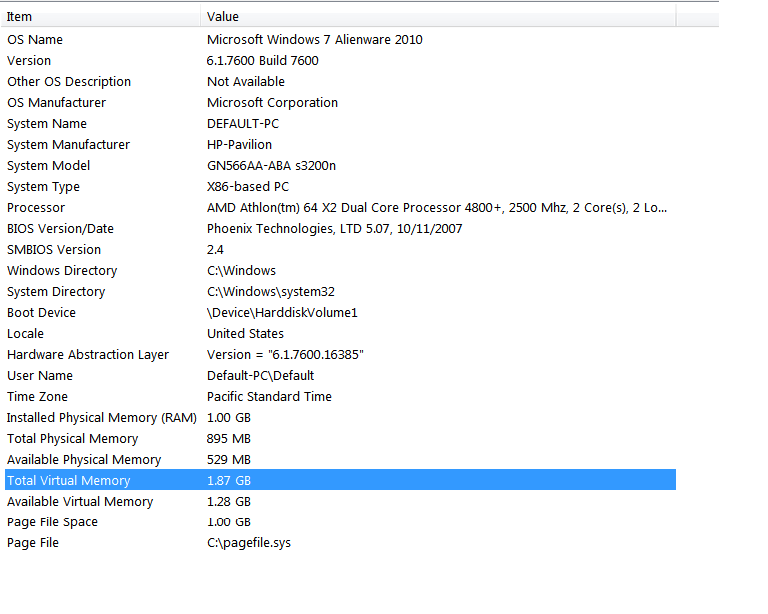
But check this out. Even though I have 1 gig of ram, it appears only half of that is used. Why is that? Is it bad? Or do these numbers look right?
print screen:
Re: Computer help - 2 hard drives with XP
Posted: Fri Jan 28, 2011 2:45 pm
by JonPorobil
BLT, I made some edits to the post you were replying to; check them out.
Was that screencap taken while Firefox was running, and while your hard drive was making that noise? If so, we may have mis-diagnosed the issue... sort of. I still highly recommend upgrading to a second stick of RAM if you hope to record music on that machine. See, it appears that Windows is using your hard drive for virtual memory before all the RAM is completely used up.
Like a hard drive, or a CD, or any data source, one stick of RAM can only feed out so much memory at a given time. So even if it's not completely tapped out, it might be failing to provide memory at the necessary speeds, causing your computer to look for a second source. This means that a second stick of RAM would help, not just because it's more raw memory to draw from, but because the computer can draw more at once - making it doubly more efficient. This is one of the primary benefits of dual-channel DDR2 RAM such as what you have in your machine - it's designed to dole out memory from two sticks at once in the most efficient manner possible. In my computer, I've got three sticks of tri-channel, DDR3 RAM, and it's amazing.
Re: Computer help - 2 hard drives with XP
Posted: Fri Jan 28, 2011 2:50 pm
by Billy's Little Trip
Thanks Jon. Yes, FF was running when I did that screen cap. I had SF and one other site open.
Damn, I love the sound of a solid state HD. That will for sure be a future option in a computer or upgrade on this one.
Yeah, I have a Fry's not too far from me. I'll get my ram there.
Re: Computer help - 2 hard drives with XP
Posted: Fri Jan 28, 2011 2:53 pm
by Billy's Little Trip
Ok, I log off the nets and the physical available memory jumped to 603 gigs. I had no idea FF used so much ram.
Re: Computer help - 2 hard drives with XP
Posted: Fri Jan 28, 2011 2:57 pm
by JonPorobil
Again, I just edited the post your replied to. I have a habit of clicking "Submit" before I'm done saying everything I want to say.

Anyway, bottom line is, I'm pretty sure an extra stick of RAM will help. (Ideally, you'd want to get two sticks of 2GB each and throw away the one that's in your computer now... but at bare minimum, get one stick of 1GB to supplement the one that's in there.)
Re: Computer help - 2 hard drives with XP
Posted: Fri Jan 28, 2011 3:03 pm
by JonPorobil
Billy's Little Trip wrote:
Damn, I love the sound of a solid state HD. That will for sure be a future option in a computer or upgrade on this one.
Yeah, I'm going to wait a year or so and then make the switch myself. I've got the above-mentioned rubber stoppers in mine, though, so hard drive noise isn't too much of an issue for me.
Billy's Little Trip wrote:Ok, I log off the nets and the physical available memory jumped to 603 gigs. I had no idea FF used so much ram.
Yeah, it's kind of sad, really. Firefox got big by being the "bare-bones, fast-running" browser after Netscape added on too many bells and whistles and got bloated. Now Firefox had befallen the same fate. It's also kind of funny, because if you look at the nuts'n'bolts of how Chrome works, there's really no reason it should be faster. And yet, I noticed a huge uptick in performance when I made the switch. Can't argue with results. There might be other guys here who can recommend even leaner browsers, but I tend to stick with what I like.